If you run a commercial print shop, a packaging plant, or a sign and large-format business, you already know this truth: printing is not just manufacturing. It's quoting hundreds of job variations, managing artwork approvals, routing work across machines, tracking waste, and delivering on tight deadlines while juggling multiple branches, currencies, and customers who want updates in real time.
That's why many African print businesses hit a wall with generic ERP systems. A traditional ERP is great at finance and procurement, but it usually doesn't understand the print job lifecycle. The result is painful workarounds: spreadsheets for estimating, WhatsApp for approvals, paper job cards on the shop floor, and manual reconciliation at month-end.
This guide breaks down the difference between print ERP software (often called a printing MIS system) and generic ERP and why a purpose-built platform like PressOps is designed to fit how African print operations actually run.
The problem: Generic ERPs fail in print operations
Most generic ERPs were built for industries with repeatable products and stable bills of materials. Print is different. Every job is a mini-project with variables that change the cost and schedule.
- Quantity, size, substrate, inks, finishing, and packaging
- Artwork versions, proof approvals, and client sign-off
- Machine routing (digital vs offset vs flexo), setup time, and capacity constraints
- Outsourced steps (lamination, binding, die-cutting, delivery)
- Waste, reprints, and quality checkpoints
A generic ERP can store a sales order, but it often lacks the print-specific logic to answer the questions that matter.
Can we quote this accurately in 10 minutes? Which press should run it, and when? How much paper and ink will we really consume? What was planned waste vs actual waste? Did the job hit margin after rework and overtime?
When those answers live outside the system, your team spends time chasing information instead of producing and selling.
What a printing MIS system must include (end-to-end)
A true printing MIS system connects the full workflow from lead to cash without forcing your team to stitch together five different tools.
Here's the practical chain most print businesses need:
CRM (Sales & Customer Profiles)
Track leads, customer history, pricing rules, and repeat jobs.
Estimating & Quotation
Build quotes using real production assumptions: materials, click charges, setup time, finishing, subcontracting, rush surcharges, and revisions.
Job Management & Production Control
Convert approved quotes into jobs, generate job cards, route tasks by work centre, and track status from prepress to finishing.
Scheduling & Capacity Planning
Assign work to machines and teams, highlight bottlenecks, and reschedule quickly when priorities change.
Inventory & Procurement
Allocate stock to jobs, trigger low-stock alerts, and raise purchase requisitions or orders when materials are needed.
Job Costing, Invoicing & Collections
Tie actual consumption and labour to the job, invoice correctly (including deposits and part-payments), and track receivables.
Quality Assurance, Rework & Waste Tracking
Record QA checkpoints, capture reprints, and measure planned vs actual waste so you can improve margins.
Many vendors describe this as the difference between MIS (production focus) and ERP (whole-business integration). In practice, print businesses increasingly need both combined in one system.
Print ERP vs generic ERP: the real difference
A generic ERP is broad. A print ERP is deep.
Generic ERP
Strong finance, purchasing, inventory, and general reporting but usually needs customization or add-ons to handle print estimating, job tickets, routing, and shop-floor realities.
Print ERP
Combines ERP-level finance and inventory with print-native estimating, production workflows, scheduling, and job costing.
A print MIS focuses on production management (estimating, scheduling, tracking), while an ERP integrates processes across the entire organization. Many print companies eventually move toward print ERP to unify both needs in one platform.
Why PressOps is different: built from day one for print operations
PressOps was designed around the real workflow of commercial printing, packaging, and sign-making businesses especially in Africa, where operations are often multi-branch, mobile-first, and cross-border.
Instead of forcing print into a generic ERP template, PressOps starts with how print actually works:
- Quote-to-job conversion with full revision history
- Production status tracking with QA checkpoints
- Waste reporting (planned vs actual) and variance analysis
- Inventory allocation to jobs, not just warehouse stock
- Multi-branch filtering and reporting
- Role-based access control (RBAC) and audit logs
The goal is simple: fewer spreadsheets, fewer blind spots, faster decisions.
Core modules overview (what you get in PressOps)
PressOps is modular, but designed to work as one connected system.
Sales & CRM
Lead management and opportunity pipeline. Customer profiles, job history, and repeat-order visibility. Client communication context so the team doesn't rely on memory.
Estimating & Quotation
Structured estimating with approvals and rush surcharges. Quote lifecycle tracking and revision history. Contract pricing support (useful for agencies and NGOs).
Client Portal
Artwork upload and proof workflow. Quote and job tracking and payment visibility. Fewer back-and-forth calls and WhatsApp threads.
Production & Operations
Quote-to-job conversion and job cards. Work-centre status tracking and QA checkpoints. Rework and reprint management for accountability.
Capacity Planner
Scheduling by work centre with drag-and-drop rescheduling. Bottleneck visibility so you can promise realistic turnaround times.
Waste Reporting
Planned vs actual waste capture. Variance insights to protect margins.
Inventory & Procurement
Stock tracking, job allocation, low-stock alerts. Purchase requisitions and orders and supplier profiles. Better material availability planning for peak seasons.
Accounting & Finance
GL, AR/AP, expenses, banking. Invoicing, credit notes, deposits, part-payments. Cleaner job-level profitability and faster month-end close.
HR & Attendance
Staff profiles, clock-in/out, leave management. Payroll support (country-specific compliance).
Support Tickets
Ticket creation and assignment. Status tracking for internal and customer-facing issues.
The African context: where generic ERP breaks fastest
African print businesses often operate under constraints generic ERPs don't account for.
Multi-currency and cross-border operations
Quoting and collecting across countries, exchange-rate exposure, and branch reporting.
Mobile-first teams
Sales reps, managers, and even production supervisors need updates on phones, not only on desktop.
Multi-branch workflows
Jobs may be quoted in one branch, produced in another, and delivered elsewhere.
Mixed connectivity
Systems must remain usable even when internet quality varies.
PressOps is built with these realities in mind so the system supports the business model you already have and the growth you're aiming for.
Dashboards and real-time visibility (the difference you feel day-to-day)
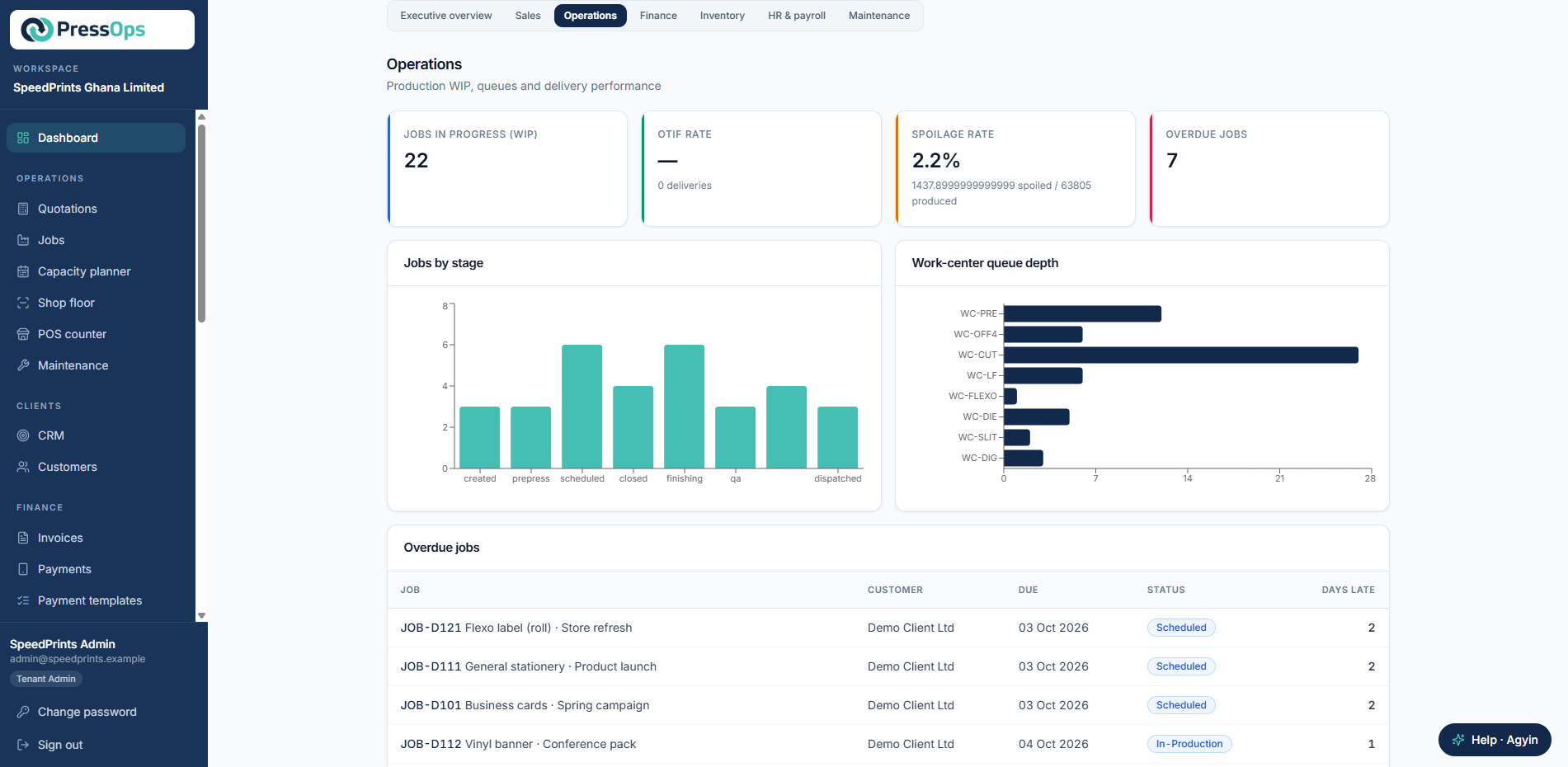
When your workflow is connected end-to-end, dashboards stop being nice to have and become operational control.
With real-time visibility, leadership can answer:
- Which jobs are late, and why?
- Which work centre is overloaded next week?
- What's our margin by product type, customer, or branch?
- Where are we losing money: waste, rework, overtime, or underquoting?
That's the difference between managing by intuition and managing by data.
How to choose: a quick checklist
If you're evaluating print ERP software, use this checklist to sanity-check any vendor:
- Can it estimate print jobs with real production assumptions?
- Can quotes convert into jobs with job cards and routing?
- Can it track waste, reprints, and QA checkpoints?
- Can it schedule by work centre and show bottlenecks?
- Can it allocate inventory to jobs and trigger purchasing?
- Can it connect job costing to invoicing and collections?
- Can it handle multi-branch, multi-currency, and mobile access?
If the answer is no to several of these, you're not looking at a print ERP. You're looking at a generic ERP that will require heavy customization.
Next step: see how PressOps works
If you want a system that's purpose-built for print operations in Africa, with quoting, production, inventory, accounting, and visibility in one place, PressOps is designed for you.
Book a demo or start a 14-day free trial to see how it works.